For the uninitiated, that's Single Point of Failure.
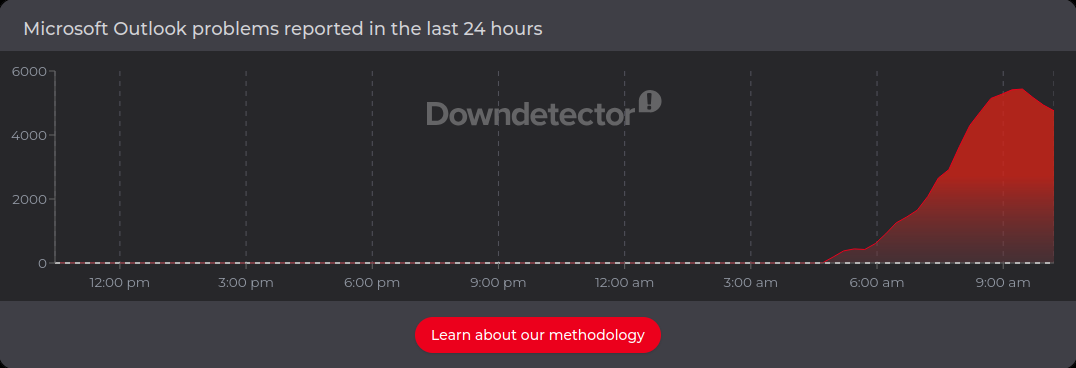
If you tried to jump online and catch up on your email this morning, there's a good chance your morning didn't go as expected. There's a good chance you were greeted by a spinning loading prompt instead. Overnight (for us Aussies), and rolling straight into our Friday morning workday on 13 November 2026, a major Microsoft 365 outage knocked out core services including Exchange Online, Microsoft Teams, SharePoint Online, Copilot 365, and Defender XDR. According to Microsoft, a large number of servers dropped offline after failing automated health checks, pushing a wave of excess load onto the rest of its infrastructure. At its peak, Down Detector logged roughly 130,000 Outlook outage reports.
Now we're a Google Workspace shop, but I'm still impacted because I work with my clients and the majority of them are Microsoft shops. This isn't even a post about Microsoft (although they've kindly offered to be the example today), rather this is an exploration of the Single Point of Failure we (and by we I mean the business world) have created in for ourselves in cloud providers.
So back to our Friday morning. For some it may feel like the weekend is starting early. Perhaps you can go and take a longer coffee break. For others, a morning without email, Teams calls, or shared documents feels like someone quietly pulled the handbrake on the entire company.
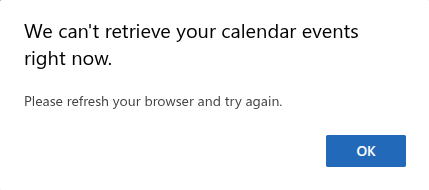
I for example, tried to access email on my major client's outlook instance and was confronted with the following message:

And taking a look at Down Detector, I'm clearly not the only one:
Over the past decade, we have been sold the same bill of goods. Sign up for an "all-in-one" cloud workplace: put your email, your files, your video meetings, and your staff logins under one big umbrella, and let a trillion-dollar tech giant worry about keeping the lights on. It's super convenient, right up until the day that umbrella starts leaking. While you cannot control when Microsoft stumbles, you can control whether a cloud hiccup turns into a lost day of business.
All your eggs
I've mentioned Single Points of Failure. Think of it as any one component that brings an entire system crashing down with it if it stops working. Think of your business tools like a physical office: Thirty years ago, your filing cabinet was in the back room, your phone line came through a copper wire on the wall, and your reception desk held the keys.
Today we put everything inside giant cloud providers (like Microsoft 365). It's almost like locking your cash register, your client files, your office phones, and your front-door key inside a single building whose locks are controlled by someone overseas who you've never met - and never will.
There's an XKCD comic that captures this concept perfectly. Although as I write this, that very same comic is doing the rounds for different reasons:

Jokes aside, since 2020 there have been at least nine major incidents that traced directly back to Microsoft's own internal changes, software automation, networking, or capacity limits, and the cause of today's outage is still being investigated. Today's disruption isn't looking like a freak once-off.
Disclaimer and caveat: The below is an AI compiled list.
| Date (UTC) | What Went Wrong Inside Microsoft | Services Hit | Duration and Business Impact |
|---|---|---|---|
| 12 Nov 2026 (13 Nov AEDT) | Cause still under investigation. Servers failed automated health checks and dropped out of service, overloading the remaining infrastructure | Exchange Online, Teams, SharePoint Online, Copilot 365, Defender XDR, Planner, To Do | Recovery under way at time of writing; roughly 130,000 Downdetector reports at peak across global regions |
| 31 Aug 2026 | A failure in a core authentication configuration inside Exchange Online cascaded across every service sharing that identity layer | Exchange Online, Teams, SharePoint, OneDrive, Purview, Copilot, Defender XDR, M365 admin centre | About 48 hours; security teams lost access to Defender XDR, the very tool meant to tell them something was wrong |
| 23 Jul 2026 | A maintenance automation bug stripped IP routes from too many network devices in Azure West US | 20+ Azure services, SharePoint, Teams, OneDrive, Copilot Chat | About 5 hours; disrupted North American users and traffic crossing West US |
| 22 Jan 2026 | Reduced capacity during infrastructure maintenance overloaded North American servers | Exchange Online, Defender, Purview, M365 admin centre, SharePoint and OneDrive search | About 10 hours; intermittent email and search failures (roughly 15,000 Downdetector reports) |
| 29 Oct 2025 | A software defect allowed an Azure Front Door configuration change to bypass safety checks | Azure Front Door, Microsoft 365, Xbox, and major customer websites | About 8 hours; disrupted airline check-ins, airports, and retailers globally |
| 30 Jul 2024 | A DDoS cyberattack triggered Azure's defences, and an error in Microsoft's own mitigation amplified the impact | Azure Front Door, CDN, App Services, Microsoft 365 | About 8 hours of widespread web and cloud service disruption |
| 18-19 Jul 2024 | A configuration update published an incomplete storage allow-list, cutting servers off from storage in Central US | Azure VMs, SQL, Cosmos DB, and Microsoft 365 apps | About 14.5 hours (hours before the unrelated CrowdStrike incident struck) |
| 25 Jan 2023 | A wide-area network (WAN) router command forced routers globally to recompute traffic paths | Azure networking, Microsoft 365, Teams, Outlook | About 5.5 hours; severed links between Azure regions and customers |
| 15-16 Mar 2021 | Automated key rotation accidentally deleted a security signing key marked to be kept | Azure AD (now Entra ID) sign-ins for M365, Teams, Azure, Xbox | About 14 hours until full residual recovery; anyone needing a fresh login token was locked out |
| 28-29 Sep 2020 | A deployment defect pushed a faulty update straight to production and broke automated rollback tools | Azure AD sign-ins for M365, Teams, and Azure portal | About 3 hours main outage (plus intermittent failures) while engineers rolled back manually |
And all of this says nothing for the outages outside Microsoft's direct control:
- August-September 2023: A lightning strike on the electrical grid caused a voltage sag that tripped cooling chillers in one of Microsoft's Sydney (Australia East) datacentre zones. Because automated systems failed to restart the chillers and only three staff were on site, critical Azure, Microsoft 365, and Power Platform services went down for up to 46 hours, disrupting Bank of Queensland, Jetstar, and thousands of local organisations.
- July 2024: A faulty content update from security vendor CrowdStrike crashed roughly 8.5 million Windows computers and Azure virtual servers worldwide, grounding flights and halting hospitals, banks, and retailers for days to weeks while technicians manually recovered machines.
- Various Dates (Subsea cables, DDoS waves, and ISP routing blips): Red Sea subsea cable cuts in September 2025 degraded Azure traffic speeds between Asia and Europe; Layer 7 DDoS attacks in June 2023 intermittently overwhelmed Outlook on the web and OneDrive; and a third-party internet provider routing mistake in January 2026 cut off Teams and Outlook access for thousands of users.
Now we've established the pattern, we need to face a bitter pill. You cannot easily buy a "spare tyre" for Microsoft 365. Running Google Workspace side-by-side in real time doubles your software bills and creates a synchronisation nightmare across calendars, emails, and file permissions. Even third-party login tools like Okta still rely on Microsoft's own identity engine (Entra ID) to hand over the digital pass that opens Outlook or SharePoint. And keeping Slack or Zoom on standby does nothing if your staff log into them using their Microsoft Single Sign-On button.
I have one client for example who uses Microsoft EntraID for logins and Google Workspace for the business apps. I'd argue this doubles their exposure to cloud provider outages.
Escaping Lock-In vs. Losing Convenience
Seeing the risks of putting every digital egg in one multinational basket, governments and larger enterprises around the world have started asking an obvious question: what if we just stop relying on a single US tech giant?
There is a genuine push (particularly in Europe) away from Microsoft lock-in and away from other large US based tech providers. But this is driven less by outage stats and more by digital sovereignty and rising costs.
A few notable examples:
- Germany's Schleswig-Holstein state is proving it can work: By late 2025 and into 2026, this northern German state migrated around 44,000 mailboxes to Open-Xchange, moved almost 80% of its administrative workstations (excluding the tax administration) onto LibreOffice, and is moving file storage to Nextcloud. It expects to save more than EUR 15 million in licence fees in 2026 against a EUR 9 million one-off investment, and the bigger step of moving desktops from Windows to Linux is still ahead.
- France and Germany are building sovereign public stacks: France has told 2.5 million civil servants to switch from Teams and Zoom to Visio (a government video platform built on open-source Jitsi) by 2027, and has ordered every ministry to plan a move from Windows to Linux, with plans due this autumn. Meanwhile, Germany's federal openDesk suite now powers around 100,000 public-sector workplaces.
- Denmark's pilot shows why "rip and replace" is tricky: In mid-2025, Denmark's digital ministry made headlines around the world for moving away from Microsoft, although the ministry later described it as a small volunteer pilot rather than a decision to leave. The 38-person Collabora pilot reportedly ran into formatting friction when staff exchanged files with Microsoft Office users, and it quietly ended in 2026 without an evaluation. Collabora says a government reorganisation, not the software, is what ended it.
- Private businesses are moving selective workloads: Software firm 37signals famously moved its predictable workloads off Amazon Web Services between 2023 and 2025, projecting over USD 10 million in five-year savings, while Airbus chose French sovereign cloud provider Scaleway in 2026 to host selected mission-critical applications alongside its existing cloud providers, after a tender reported to be worth more than EUR 50 million.
There's a reality-check under all of this. If you're a small business then self-hosted and open-source tools, like Nextcloud, LibreOffice, Jitsi, or Matrix, free you from vendor lock-in and surprise licence hikes. But the trade-off is convenience. Microsoft 365 is popular because it is largely "set and forget" until something breaks. Running your own self-hosted email and collaboration servers means you (or your IT provider) become responsible for server maintenance, security patching, spam filtering, backups, and sorting out formatting quirks when a client emails you a complex Excel spreadsheet.
How about the practical steps?
- Map your dependencies: Grab a whiteboard and list every core workflow, from invoicing and client onboarding to quoting and payroll, and note what relies on Microsoft 365 or Entra ID logins. Pay special attention to "hidden" links, like old Microsoft Access databases, macro-heavy spreadsheets, or third-party cloud apps where your team clicks "Sign in with Microsoft". There's a massive caveat to all of this - if there's one thing past global outages have shown us, it's the interconnectedness of apps and services. If your critical applications are dependent on the cloud provider that happens to be having a bad day today, those apps are having a bad day too.
- Out of band comms: This one is near and dear to my heart. Think about it for a minute, if Teams and Outlook go down at 9:00 AM, how do you tell your team what is happening? Having a dedicated backup channel, such as Signal, or an SMS broadcast list that doesn't rely on your business email / logins working is your get out of jail free card. I say this is near and dear to my heart as I've established these channels for cyber incidents in past businesses. My pick was always Threema Work.
- Hold the email: Way back in the days of SMTP, locally hosted exchange and POP3 access you may have had multiple email servers and MX records that told incoming email where to go. Today you're likely using a global email provider so your strategy needs to change. If you're using an external email gateway (like Mimecast) they can store your email if your primary provider is down. Then you can redirect it elsewhere for emergency access if the outage looks prolonged.
- Local backup to the rescue: Sync is not backup. But if you have real backup, it can help with an outage not just a data loss event. Provided your data is stored in your backup as a normal file system (no proprietary formats), then you can gain offline access to it if OneDrive is refusing to work.
- Diversify your internet: We've spoken about this a few times in this blog. An outage isn't always Microsoft's fault; sometimes an internet provider's routing table breaks; or a backhoe snacks on some stranded glass fibre. Pairing your office NBN connection with a 5G failover router or a standby Starlink dish keeps your team connected to alternative tools during local network blips.
Real Resilience Without the Enterprise Headache
Cloud software has given Australian small businesses access to enterprise-grade collaboration at a fraction of the old cost, and for most teams, Microsoft 365 (or Google Workspace) will remain the daily engine room. Today's outage is simply a timely reminder that convenience always carries concentration risk, and that resilience comes from how you prepare around the edges rather than hoping a tech giant never makes a mistake.
At secureAF, we take what works in enterprise cyber security and resilience and scale it down for Australian small and micro businesses. If today's outage has you wondering how your business would cope if email and files stayed offline for two days instead of two hours, book a free 15-minute call with our Melbourne team or explore how we can help.